从单组件到容器
上一篇 把一个组件的配方拆开了:类是接驳点,UXML / USS 是跟在它后面的资产。到这里为止,装配还停在单个组件自己这一层。
这一篇里,根组件开始在自己的模板里直接声明子组件,装配链也随之沿着组件树继续向下展开。
根模板先变成容器
这一步里,宿主窗口没有变化。TemplateBlogAppWindow 仍然只做一件事:实例化根组件,然后把它挂到窗口里。变化发生在根组件自己的模板上。
当前示例的目录也开始按职责拆开:根布局放进 Layout/,子组件放进 Components/。
TemplateBlogApp/
├─ Components/
│  ├─ TemplateBlogHeader.cs
│  ├─ TemplateBlogHeader.uxml
│  ├─ TemplateBlogHeader.uss
│  ├─ TemplateBlogIntroCard.cs
│  ├─ TemplateBlogIntroCard.uxml
│  └─ TemplateBlogIntroCard.uss
├─ Layout/
│  ├─ TemplateBlogAppLayout.cs
│  ├─ TemplateBlogAppLayout.uxml
│  └─ TemplateBlogAppLayout.uss
├─ TemplateBlogAppWindow.cs
根组件类本身依旧保持在最小形态:
using UnityEngine.UIElements;
using Zhujing.Editor.UI.Framework;

namespace Zhujing.Editor.UI.Examples.TemplateBlogApp
{
    public class TemplateBlogAppLayout : TemplateElement
    {
        public new class UxmlFactory : UxmlFactory<TemplateBlogAppLayout, UxmlTraits> { }

        public new class UxmlTraits : VisualElement.UxmlTraits { }
    }
}
这里没有新增任何构树代码,也没有写任何手动实例化子组件的语句。目录拆分只是把根布局和子组件各自归位,真正的变化仍然发生在根布局对应的同名 UXML:
<?xml version="1.0" encoding="utf-8"?>
<ui:UXML xmlns:ui="UnityEngine.UIElements" xmlns:blog="Zhujing.Editor.UI.Examples.TemplateBlogApp">
    <ui:VisualElement class="template-blog-root">
        <ui:Label text="Template Blog App" class="template-blog-title" />
        <blog:TemplateBlogHeader />
        <blog:TemplateBlogIntroCard />
    </ui:VisualElement>
</ui:UXML>
和 Hello World 相比,这里最关键的变化只有一处:父模板里不再只有原生元素,而是直接出现了两个自定义组件标签。根组件也从单个模板组件变成了模板容器。
子组件沿用同一套配方
这两个子组件本身没有引入新的机制。它们仍然只是最小的模板组件:
public class TemplateBlogHeader : TemplateElement
{
    public new class UxmlFactory : UxmlFactory<TemplateBlogHeader, UxmlTraits> { }
    public new class UxmlTraits : VisualElement.UxmlTraits { }
}

public class TemplateBlogIntroCard : TemplateElement
{
    public new class UxmlFactory : UxmlFactory<TemplateBlogIntroCard, UxmlTraits> { }
    public new class UxmlTraits : VisualElement.UxmlTraits { }
}
它们各自也配了一份同名 UXML:
<?xml version="1.0" encoding="utf-8"?>
<ui:UXML xmlns:ui="UnityEngine.UIElements">
    <ui:VisualElement>
        <ui:Label text="TemplateBlogHeader" />
    </ui:VisualElement>
</ui:UXML><?xml version="1.0" encoding="utf-8"?>
<ui:UXML xmlns:ui="UnityEngine.UIElements">
<ui:VisualElement>
<ui:Label text="TemplateBlogIntroCard" />
</ui:VisualElement>
</ui:UXML>嵌套组件没有发明新配方。父组件与子组件遵守的是同一条规则,区别只在于这次子组件不是由外部代码手动 new 出来,而是出现在父模板的声明里。
递归装配的结果
这个版本的界面还没有引入子组件各自的独立 USS,结果仍然很朴素。但也正因为它足够收敛,递归装配反而更容易看清:根组件把自己的模板克隆出来之后,父模板里声明的两个子组件没有停留在标签名,而是继续按各自的类型去接上自己的 UXML。
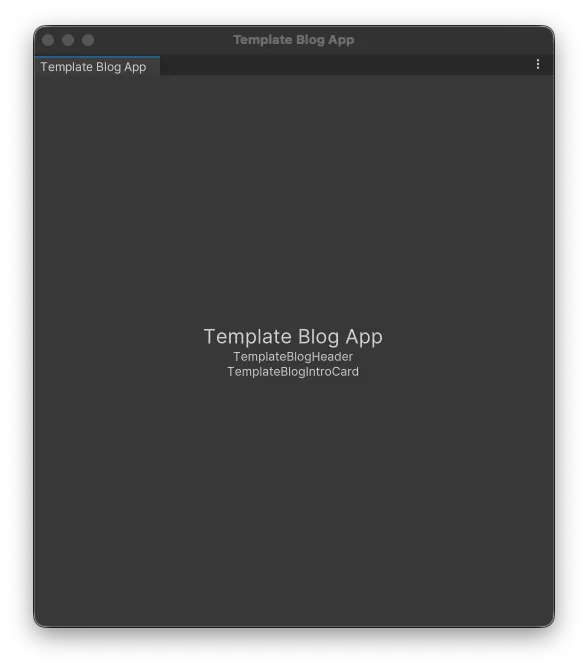
窗口里同时出现根组件内容和两个子组件的文字结果,说明父模板里的自定义组件标签已经被系统继续解析,并装配成真实的子树。
容器与子组件各自回到样式层
递归装配成立之后,布局和样式也重新回到各自的组件边界上。到了这一版,根组件和两个子组件的模板内容也一起收成了更像页面切片的文案;装配链没有变化,变化主要落在各自的模板内容和同名 USS 上。
到了带样式的完成态,根组件的 UXML / USS 会收成这样:
<?xml version="1.0" encoding="utf-8"?>
<ui:UXML xmlns:ui="UnityEngine.UIElements" xmlns:blog="Zhujing.Editor.UI.Examples.TemplateBlogApp">
    <ui:VisualElement class="template-blog-page">
        <ui:VisualElement class="template-blog-page-shell">
            <ui:Label text="Template Blog App" class="template-blog-page-kicker" />
            <ui:Label text="A minimal page shell that now expands through nested template components." class="template-blog-page-copy" />
            <blog:TemplateBlogHeader />
            <blog:TemplateBlogIntroCard />
        </ui:VisualElement>
    </ui:VisualElement>
</ui:UXML>
.template-blog-page {
flex-grow: 1;
padding-left: 24px;
padding-right: 24px;
padding-top: 24px;
padding-bottom: 24px;
background-color: rgb(244, 247, 251);
}
.template-blog-page-shell {
flex-grow: 1;
gap: 14px;
}
.template-blog-page-kicker {
-unity-font-style: bold;
font-size: 15px;
color: rgb(31, 41, 55);
}
.template-blog-page-copy {
white-space: normal;
color: rgb(88, 96, 109);
}子组件的模板内容和 USS 也一起收回到各自的边界里:
<?xml version="1.0" encoding="utf-8"?>
<ui:UXML xmlns:ui="UnityEngine.UIElements">
    <ui:VisualElement class="template-blog-header">
        <ui:Label text="Nested Components" class="template-blog-header-chip" />
        <ui:Label text="The root template now grows as a tree." class="template-blog-header-title" />
        <ui:Label text="The parent template keeps the page shell, while the child component below completes its own template and style assembly." class="template-blog-header-copy" />
    </ui:VisualElement>
</ui:UXML><?xml version="1.0" encoding="utf-8"?>
<ui:UXML xmlns:ui="UnityEngine.UIElements">
<ui:VisualElement class="template-blog-intro-card">
<ui:Label text="What stays local to each component" class="template-blog-intro-card-title" />
<ui:Label text="1. The parent component owns the page shell and overall spacing." class="template-blog-intro-card-copy" />
<ui:Label text="2. TemplateBlogHeader keeps its own UXML and its own USS." class="template-blog-intro-card-copy" />
<ui:Label text="3. TemplateBlogIntroCard follows the same rule and lands in the same tree." class="template-blog-intro-card-copy" />
</ui:VisualElement>
</ui:UXML>.template-blog-header {
padding-left: 18px;
padding-right: 18px;
padding-top: 18px;
padding-bottom: 18px;
border-top-left-radius: 12px;
border-top-right-radius: 12px;
border-bottom-right-radius: 12px;
border-bottom-left-radius: 12px;
background-color: rgb(232, 240, 255);
}
.template-blog-header-title {
margin-top: 10px;
font-size: 22px;
}
.template-blog-intro-card {
padding-left: 18px;
padding-right: 18px;
padding-top: 18px;
padding-bottom: 18px;
border-top-left-radius: 12px;
border-top-right-radius: 12px;
border-bottom-right-radius: 12px;
border-bottom-left-radius: 12px;
background-color: rgb(255, 255, 255);
}
.template-blog-intro-card-title {
font-size: 18px;
}这里发生的不是“父组件统一替子组件上样式”,而是根组件和子组件各自回到自己的资产边界里:父组件的 USS 管页面壳,TemplateBlogHeader 管页头区,TemplateBlogIntroCard 管说明区。装配把它们接成同一棵树,样式也沿着各自的组件边界落回去。
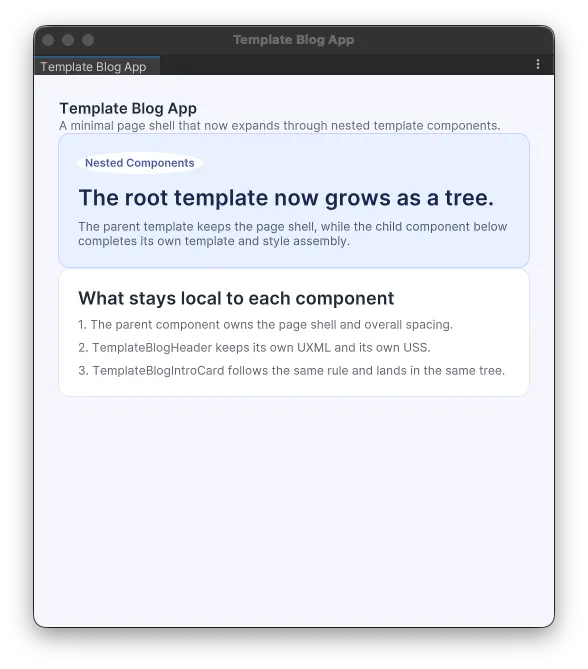
到这里,父模板里声明子组件带来的变化已经完整展开了:装配沿着组件树继续向下走,样式也沿着组件边界各自落回去。根组件不需要接管子组件的内容和外观,子组件也不需要脱离父模板单独出现;它们一起落在同一棵模板树里。
心智与编写体验
写到这里,组件的心智也开始稳定下来:根组件负责把页面分成几个区域,子组件各自守住自己的结构、样式和局部行为。父模板里写下的,不再只是几块原生元素,而是一棵由组件继续展开的界面树。
编写时的感觉也会跟着变。注意力可以先放在“这一块界面由哪些组件组成”,再回到每个组件自己的 UXML / USS 里处理细节;父组件负责组合,子组件负责自洽。模板系统在这里带来的,不只是少写几句构树代码,而是把界面的组织方式从一串 Add(...) 调用,重新拉回到组件树本身。
组件树展开之后,模板里也不再只有“有哪些组件”这一层信息了。下一篇(模板 token 规格)就接着往前走一步,看看这套模板语言还准备把哪些信息写进模板里。